



For thirty years I have been asked a version of the same question by people about to spend money and evenings on a course: “Which software should I learn to earn more?” The honest answer is more complicated than any ranking of programs, and most of what you read online is, bluntly, guesswork dressed up as data.
I once watched a talented drafter spend an entire winter earning three software certificates. He was proud of them, and he should have been. His salary did not change. A colleague who had never collected a certificate, but who volunteered to coordinate the structural and mechanical drawings on a difficult project, received a promotion and a raise within the year. Both of them were learning. Only one of them was learning something that changed what they were responsible for.
This guide separates what we actually know about pay and skills from what people claim. I will start with the uncomfortable truth, that there is no official wage data by software or by certificate in Canada, then show you the one thing the official data does tell us, and finally give you a practical way to decide which skills and credentials are worth your time and money.
The Short Answer
- Job Bank, Statistics Canada and the provincial surveys do not publish wages by software or by certificate. Any website that gives you a precise “Revit premium” or “SolidWorks premium” is guessing, or comparing job titles instead of tools.
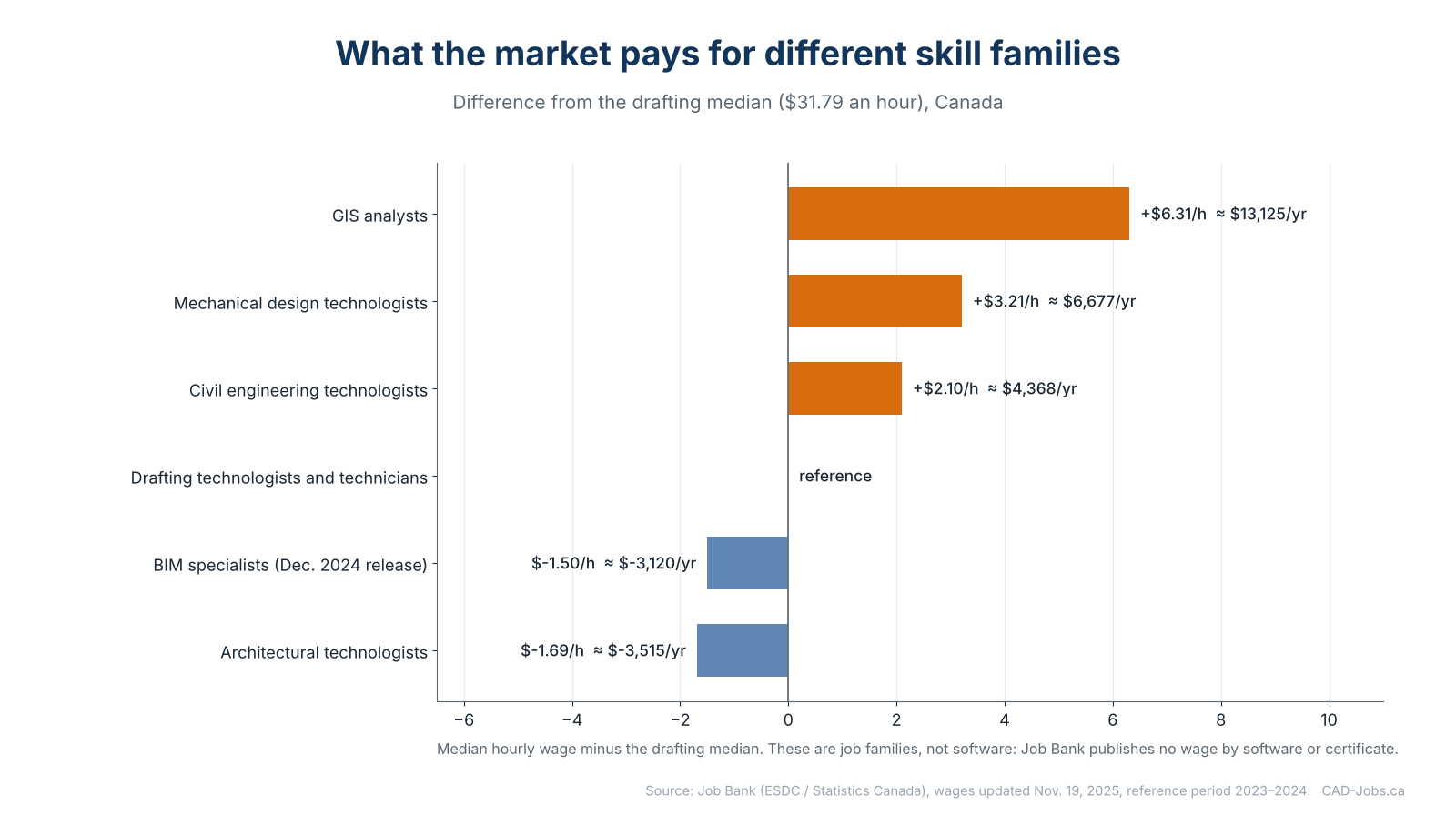
- What the data does show is a difference between job families. At the national median, GIS analysts earn about $6.31 an hour more than drafting technologists and technicians, mechanical design technologists $3.21 more and civil engineering technologists $2.10 more. Architectural technologists earn about $1.69 less, and the BIM specialists in Job Bank’s December 2024 release about $1.50 less.
- Skills move your pay in three ways: they get you hired, they move you up inside your range, or they move you into a different, better-paid job family. The third is the most powerful, and certificates alone rarely do it.
- My rule after thirty years: invest first in skills that increase what you are responsible for, then in skills that make you faster and more accurate, and last in credentials that prove what you already do.
All Job Bank figures come from the release updated on November 19, 2025 (BIM specialists from December 2024), reflecting wages paid in 2023–2024. For how the data is built, see CAD, BIM and Drafting Salaries in Canada: The Complete 2026 Data Guide.
What the Official Data Actually Shows
Here is the national median wage of each job family, compared with drafting technologists and technicians.
| Job family | National median | Difference from drafting median | About per year |
|---|---|---|---|
| GIS analysts | $38.10 | +$6.31 | +$13,100 |
| Mechanical engineering design technologists | $35.00 | +$3.21 | +$6,700 |
| Civil engineering technologists | $33.89 | +$2.10 | +$4,400 |
| Drafting technologists and technicians | $31.79 | reference | reference |
| BIM specialists (December 2024 release) | $30.29 | −$1.50 | −$3,100 |
| Architectural technologists | $30.10 | −$1.69 | −$3,500 |
Annual differences use 2,080 hours and are rounded to the nearest $100.
Please read this table carefully, because it is easy to misuse.
It does not say that learning Civil 3D adds $4,400 to your salary. It says that people whose work is classified as civil engineering technology earn, at the median, $2.10 more than people classified as drafting technologists. Those workers use many tools. What the market rewards is the combination of engineering content, responsibility and tools, not a single program.
It does not say BIM pays less. BIM specialists in the older December 2024 release have a median close to the drafting median. What pays more in BIM is the move from building models to coordinating and managing them, as I show in BIM Coordinator, Modeler and Manager Salaries in Canada.
What it does say is something useful: the market pays more when your job contains more engineering judgment, more analysis or more coordination, and the software is simply how you do that work.
The Three Ways a Skill Affects Your Pay
After years of hiring, I think of every skill and credential as doing one of three things.
1. Gate skills: they get you into the room
These are the skills without which you will not be hired for the job family you want. For a drafter in Canada they are, typically, solid AutoCAD or Revit fundamentals, a recognized diploma, the ability to read drawings and a clean portfolio. Having them does not raise your pay. Not having them keeps you out.
2. Differentiators: they move you up inside your range
Within one job family, the difference between the 10th and 90th percentile is large. For drafting technologists and technicians, it is $21.50 versus $48.38 an hour. Differentiators are the skills that place you higher in that range: depth in your main software, the ability to build templates and standards, checking other people’s work, working with minimal supervision and communicating with engineers and clients.
3. Multipliers: they move you into a better-paid family
These are rare and powerful. A drafter who adds civil design skills and becomes a civil technologist. A designer who adds engineering calculations and becomes a mechanical design technologist. A CAD professional who adds data and spatial analysis and becomes a GIS analyst. A modeler who adds coordination and standards and becomes a BIM manager. This is where the biggest, most durable salary changes come from, and it usually requires a new responsibility, not only a new tool.
A Skill-by-Skill Reading Guide
I cannot give you a dollar value for each item, so I give you something more useful: what it does, how strong the evidence is and when it is worth the effort.
| Skill or credential | What it mainly does | Strength of the evidence | Worth it when |
|---|---|---|---|
| Solid AutoCAD or Revit fundamentals | Gate: gets you hired | Strong: the core of the job descriptions | Always, at the start |
| College diploma in design, architectural or engineering technology | Gate: baseline for the family | Strong: Job Bank lists a college diploma or apprenticeship as the usual requirement | Before you specialize |
| Advanced Revit (families, worksets, standards) | Differentiator, and the entry to BIM coordination | Medium: BIM wage data is thin, my experience is strong | When your firm delivers BIM projects |
| Civil 3D depth | Differentiator, and a bridge to the civil family | Medium: the civil family median is $2.10 above drafting | In land development and infrastructure |
| SolidWorks or Inventor with real design responsibility | Multiplier into mechanical design | Medium: the mechanical design median is $3.21 above drafting | When you decide shape, material and fit |
| GIS (ArcGIS Pro or QGIS) with SQL and Python | Multiplier into GIS | Medium: the GIS median is $6.31 above drafting, but roles differ in education and skills | If you enjoy data and spatial analysis |
| BIM coordination, standards and ISO 19650 knowledge | Multiplier toward coordinator and manager roles | Low to medium: no official wage line, strong in my experience | If you want to lead BIM work |
| Automation (Dynamo, AutoLISP, Python) | Differentiator | Low: no data, consistently valued in my experience | When you do repetitive tasks every week |
| Technologist designation (C.Tech., C.E.T., AScT) | Differentiator for senior roles, required for some titles | Medium: WorkBC notes certification may be required by employers | On a path to senior or lead roles |
| Vendor certificates (Autodesk, SolidWorks, Esri) | Proof of skill, helps hiring | Low as a pay lever | Early in your career or when changing employers |
| GD&T knowledge (ASME Y14.5) | Differentiator in mechanical design | Low to medium: scarce skill in my experience | Mechanical designers |
| Project management credential (for example PMP) | Differentiator toward coordination and management | Low | When moving toward management |
| Checking others’ work, mentoring, writing standards | Differentiator and leadership | Medium: Alberta’s survey shows top-of-scale pay far above starting pay | Always |
| French in Québec | Gate: working language of most employers | Strong | If you work in Québec |
“Evidence” describes how much official data supports the effect. Where it says my experience, it is professional judgment and not a statistic.
How I would use this:
- If you are at the start, focus on the gate row for your family and one differentiator.
- If you are at the middle, pick one multiplier and work toward it deliberately, through projects and not only through courses.
- If you are senior, invest in leadership, standards and communication, because there is no tool left that will move your pay as much.
Software: What to Learn and Why
There is no software that pays more by itself. There are, however, software ecosystems where certain high-value work lives.
AutoCAD is the baseline in Canadian drafting. It is a gate skill almost everywhere, and a differentiator only when you go deep: custom templates, dynamic blocks, sheet sets and, for some people, AutoLISP automation.
Revit is the baseline in building design. A Revit user who can manage families, worksets, views and sheets is much more valuable than one who only models. Revit is also the entry to BIM coordination.
Civil 3D is the core tool of land development and infrastructure. It sits inside the civil family, which has a higher national median than general drafting. The tool matters because the work it enables is higher in the engineering chain.
SolidWorks, Inventor and Fusion are the main tools of mechanical design. Choosing among them is mostly about what local employers use. I compare them in SolidWorks vs Inventor vs Fusion: Which Gets You Hired in Canada?
Navisworks, Dynamo and scripting. These tools carry automation and coordination, which are signs of responsibility. Employers value people who can automate repetitive work and manage coordination, but they pay for the outcome, not the tool.
ArcGIS Pro, QGIS, SQL and Python. These are the center of GIS work, and the family with the highest median in this guide. For CAD and BIM professionals, they are the single best second skill I know of.
For the demand side, see Most In-Demand CAD Software in Canadian Job Ads: 2026 Analysis and Revit vs AutoCAD for Jobs in Canada: A Data-Based Comparison.
Certifications and Designations: What They Prove
A certification is proof, not a promotion. It tells an employer that you passed a standard test, which reduces their risk when they know little about you. That is valuable at three moments: when you are entering the field, when you are changing employers and when you are changing specialty.
Vendor certifications
- Autodesk Certified User and Certified Professional. Autodesk offers certifications for AutoCAD, Revit, Civil 3D, Inventor and other products. They are useful evidence of skill, especially early in your career.
- SolidWorks certifications from Dassault Systèmes. The Certified SOLIDWORKS Associate (CSWA), Professional (CSWP) and Expert (CSWE) provide a clear ladder.
- Esri technical certifications for ArcGIS, valued by employers who use the Esri platform.
Industry and professional credentials
- Technologist designations such as C.Tech., C.E.T. and AScT, granted by provincial associations. These are the credentials that matter most for senior and lead roles in Canada, and they are required for certain titles and signatures. See Technologist Certification in Canada: C.Tech., C.E.T., AScT and Provincial Associations Explained.
- GISP (GIS Professional), a professional certification offered by the GIS Certification Institute.
- buildingSMART professional certification for open BIM workflows.
- ASME GD&T professional certification for people who work with geometric dimensioning and tolerancing, one of the most valuable and least common skills in mechanical design.
- Project management credentials such as the PMP from the Project Management Institute, relevant when you move toward coordination and management.
I explain which of these actually move hiring decisions in Which CAD, BIM and GIS Certifications Actually Help You Get Hired?
A simple test before you pay for a certification
Ask yourself four questions.
- Do the job postings I want ask for it? If they do, it is a gate. If they do not, it is optional.
- Does it prove something I cannot easily show another way? A strong portfolio often beats a certificate.
- Will it change what I am responsible for? If not, it is a nice-to-have.
- What is the total cost? Fees, study time and renewal. A certificate you let expire is wasted money.
Skills That Are Not Software
In my experience, the people who earned the most were not distinguished by a program. They were distinguished by these.
- Reading engineering intent. Understanding why something is designed a certain way and spotting when it is wrong.
- Standards and templates. The person who builds the office standard is paid like a manager.
- Checking and mentoring. If you make other people better, you are worth more than your own output.
- Client and contractor communication. Clarity under pressure is scarce.
- Estimating and quantities. Knowing how much, how long and how much it costs.
- Automation. Dynamo, AutoLISP, Python or just advanced Excel. Anything that removes repetitive hours.
- Business sense. Understanding how your firm makes money, and how your work contributes to it.
- French in Québec. In Québec, working in French is not a skill premium. It is the entry ticket.
For the full list of what employers ask for, read Top 25 CAD, BIM and GIS Skills Employers Ask For in Canada.
How to Choose What to Learn Next
Here is the decision method I use with people I mentor.
- Write down your current job family (drafting, architectural, civil, mechanical design, BIM, GIS).
- Write down the family you want to be in in three years.
- Look at 10 real job postings for that target role and list the skills that appear in at least half of them.
- Compare with your own list. The gaps are your plan.
- Choose one skill that increases your responsibility (coordination, checking, design calculations, data analysis) and one tool.
- Prove it on a real project, even a small one, and add it to your portfolio.
- Then, and only then, consider the certificate.
If you are a drafter wondering where to begin, read Which CAD Software Should You Learn First? A Career-Path Decision Guide and Automation Skills for CAD and BIM Careers: Dynamo, AutoLISP and Python.
Mistakes I See Constantly
- Collecting certificates instead of responsibility. Employers promote people who carry more, not people who hold more paper.
- Learning a tool nobody in your market uses. Check local postings first.
- Believing a salary website’s “premium for X”. If the site cannot explain its method, ignore the number.
- Ignoring the job family. The biggest pay differences in the data are between families, not between programs.
- Not asking for what you have learned. If you take on new responsibilities, raise it at your next review with evidence. My scripts are in How to Negotiate a CAD Salary or Raise in Canada: Data, Scripts and Strategy.
Frequently Asked Questions
Which CAD software pays the most in Canada? There is no official wage by software. The job families with higher medians are GIS analysts, mechanical design technologists and civil engineering technologists, and those families use specific tools, but it is the work that is paid, not the tool.
Does a Revit certification increase my salary? Not by itself. It can help you get hired or change jobs, and it supports a move into BIM coordination, where pay rises with responsibility.
Is SolidWorks better paid than AutoCAD? They serve different job families. Mechanical design technologists have a higher national median ($35.00) than drafting technologists ($31.79), but that reflects engineering content, not the software alone.
Is GIS worth learning if I am a CAD drafter? In my experience it is one of the best second skills available. GIS analysts have the highest national median of the families covered in this guide ($38.10 an hour).
Does a technologist designation raise my pay? There is no official number. It matters most for senior and lead roles and for work that needs a certified signature.
How much should I spend on certifications? Only as much as the evidence supports: check postings first, then decide. A certificate that no employer in your market asks for is a hobby.
Sources
- Job Bank: Design and drafting technologist wages (NOC 22212)
- Job Bank: Civil engineering technologist wages (NOC 22300)
- Job Bank: Mechanical engineering design technologist wages (NOC 22301)
- Job Bank: Architectural technologist wages (NOC 22210)
- Job Bank: Geographic information systems (GIS) analyst wages (NOC 22214)
- Job Bank: BIM specialist wages, release of December 2024
- Job Bank: How wages are determined
Wages describe 2023–2024. Certification programs and fees change, so check each provider’s current requirements.
Learn what makes you responsible for more, and the tools will follow. Collect tools for their own sake, and you will have a very good-looking CV and the same salary.